Introduction
If you run a WooCommerce store, you already know one painful truth:
Emails can make or break your business.
Every order placed on your site triggers a chain of important emails — order confirmations, customer notifications, booking receipts, refund updates, admin alerts, and more. These emails reassure your customers and keep your store running smoothly.
But here’s the real problem…
WooCommerce Emails Fail More Often Than You Think
- Sometimes customers don’t receive their order confirmation.
- Sometimes your admin doesn’t get the “New Order” email.
- Sometimes a booking receipt never arrives.
- And sometimes everything looks fine on your side… but the customer is silently left waiting.
What makes it worse?
- WooCommerce doesn’t show any error when an email fails.
- WordPress doesn’t log anything.
- You just hope emails are being delivered.
And hope is not a strategy.
This is exactly the situation that inspired the creation of Mail Doctor Plugin.
Meet Mail Doctor — Your WooCommerce Email Problem Solver
Mail Doctor is a WordPress plugin built specifically for WooCommerce store owners, agencies, and developers who want reliable, transparent, and trackable email delivery.
Think of it as your store’s personal email supervisor — watching every email, inspecting it, logging it, and letting you know exactly what’s going on behind the scenes.
With Mail Doctor installed, you can finally:
- See every email WooCommerce sends
- Track when it was triggered and by which action
- View complete email details
- Troubleshoot delivery issues instantly
- Resend any email with one click
- And understand why an email succeeded or failed
If email problems have ever caused confusion, support messages, or unhappy customers, Mail Doctor takes that stress away.
Why WooCommerce Emails Fail (And Why You Need a Solution)
Most WooCommerce stores rely on the default WordPress email system, which is fragile, unpredictable, and often blocked by hosting environments.
So when emails fail, there’s:
- No notice
- No logs
- No warnings
- No explanations
Just disappointment… and sometimes lost revenue.
Mail Doctor fixes this by giving you full visibility into your WooCommerce emails.
Instead of guessing, you get clarity. Instead of hoping, you get control.
Who Is Mail Doctor For?
Mail Doctor is made for everyone who wants their WooCommerce store to run smoothly:
✔ Store Owners
- Want reliable order confirmations
- Are tired of customers saying “I didn’t receive the email”
- Need a simple dashboard to track email activity
- Appreciate one-click troubleshooting
✔ Developers & Agencies
- Want deep debugging tools
- Need logs, metadata, and error tracking
- Want flexible hooks and filters
- Care about email reliability for client sites
- Prefer plugins with clean structure and extendable code
Whether you’re running a small store or managing hundreds of daily orders, Mail Doctor gives you the confidence that your emails are doing their job.
If WooCommerce emails are the “heartbeat” of your business…
Mail Doctor makes sure that heartbeat never skips.
Key Features of Mail Doctor
Running a WooCommerce store means hundreds of important emails are sent every month — order confirmations, invoices, shipment updates, refund notices, admin alerts, booking receipts, and more.
But what if even one of those emails fails?
A confused customer.
A missed order.
A delay in support.
An unhappy buyer.
Mail Doctor is designed to prevent exactly that.
Here’s what it offers specifically for WooCommerce store owners.
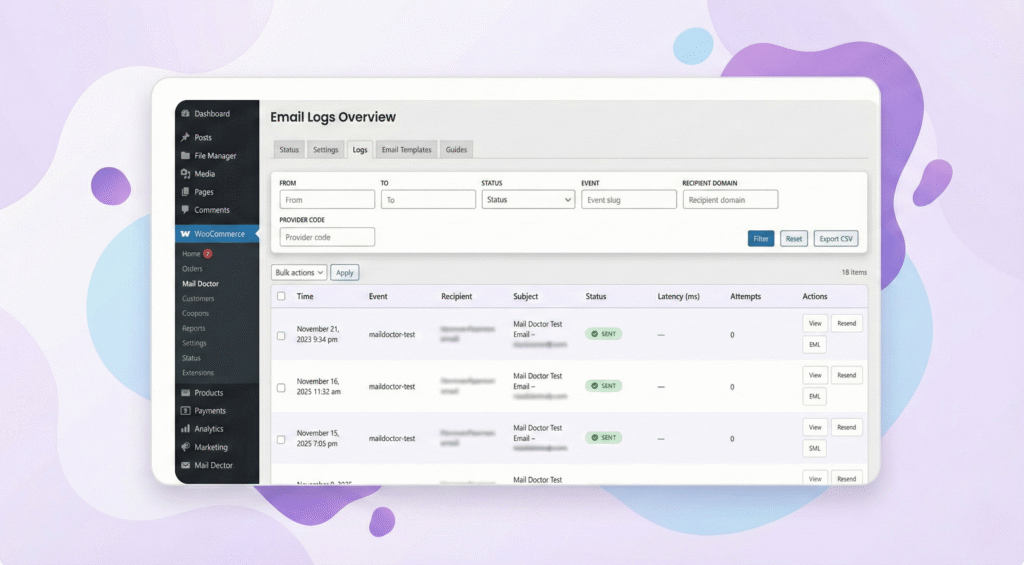
1. Every WooCommerce Email Logged Automatically
Mail Doctor keeps a record of every single email your store sends.
You can instantly check:
- Was the email sent?
- Who received it?
- When was it triggered?
- What type of WooCommerce email was it?
- Did it fail or succeed?
This means no more guessing — you always know what happened.
2. See What Customers Actually Receive (Email Preview)
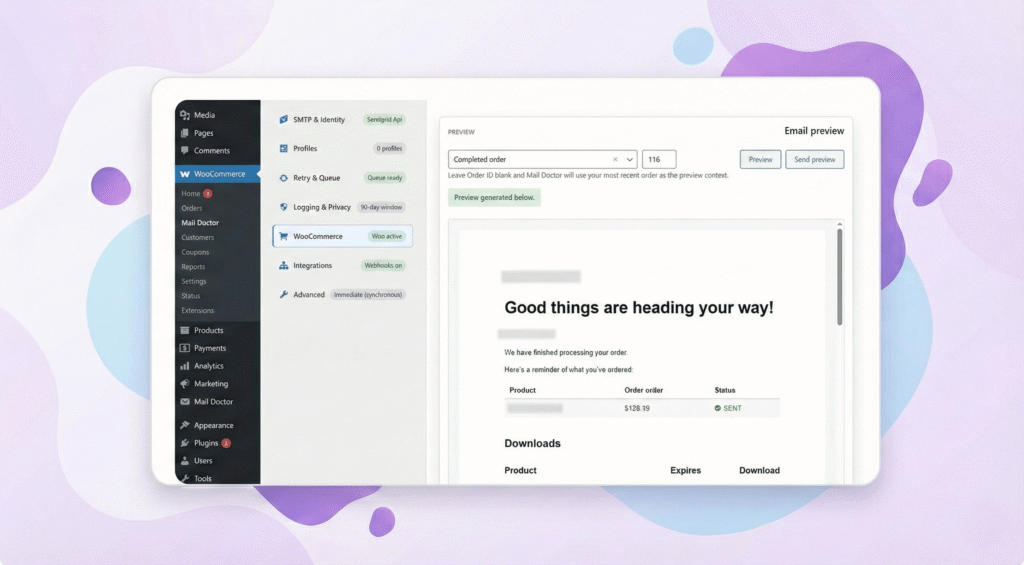
Sometimes you want to check:
- What your order email looks like
- Whether the design is correct
- If your message makes sense
- If your branding appears properly
Mail Doctor lets you open any WooCommerce email and see the exact version your customer received.
3. Resend Any Email in One Click

A customer says, “I didn’t get my order confirmation.”
Before Mail Doctor, you had to:
- Re-create the order
- Or send a manual email
- Or waste time troubleshooting
With Mail Doctor, you just:
👉 Open the log
👉 Click “Resend”
👉 Done
Fast, simple, stress-free.
4. Clear Email Status — Sent or Failed
If WooCommerce sends an email and it fails, YOU instantly know.
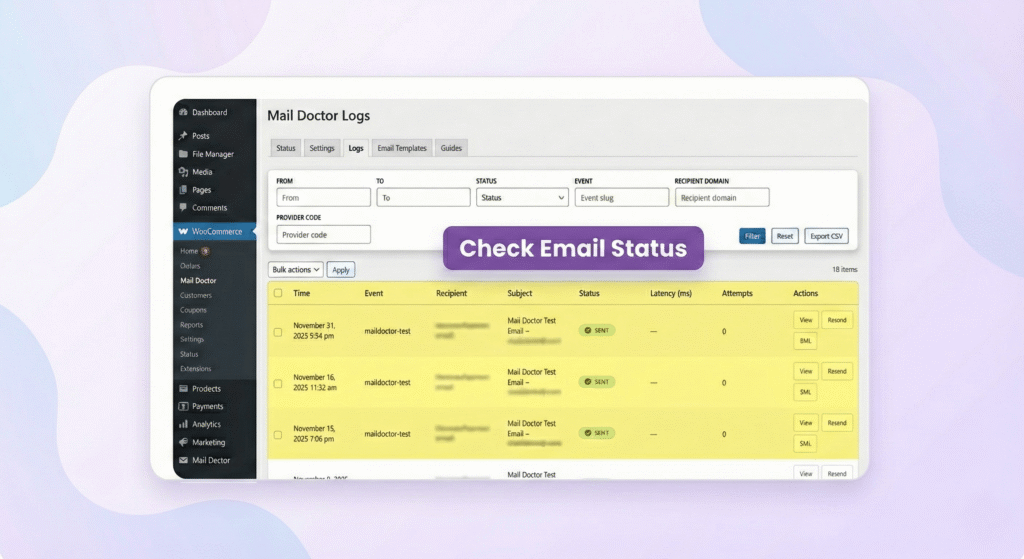
Mail Doctor shows:
- Green ✔ Email Sent
- Red ✖ Email Failed
No more silent problems.
No more hidden issues.
No more customer surprises.
You see everything in real time.
5. WooCommerce-Focused Email Tracking
Mail Doctor is specially built for WooCommerce stores. It tracks all the important store emails, including:
- New Order emails
- Order Confirmation emails
- Customer Invoice emails
- Booking confirmations
- Shipment notifications
- Refund notifications
- Cancelled order alerts
- Admin notices
If it’s related to WooCommerce, Mail Doctor monitors it.
6. Helps You Fix Email Problems Quickly
Most store owners struggle because WooCommerce emails depend on proper email settings.
Mail Doctor helps by:
- Showing email delivery errors
- Providing suggestions to fix issues
- Letting you run test emails
- Checking if your store is using proper SMTP
- Warning you when settings are wrong
Even if you’re not technical, Mail Doctor guides you with simple language.
7. Helpful Dashboard Made for Non-Technical Users
Mail Doctor gives you a clean, friendly dashboard where you can:
- See all emails at a glance
- Use filters to find specific emails
- Open details with one click
- Understand what’s happening instantly
No coding.
No complicated settings.
Just clear, easy information.
8. Track Customer Email Activity More Clearly
Mail Doctor also helps you understand:
- Where the email was sent
- Which order triggered it
- What was inside the message
- Which customer received it
This makes customer support much easier.
When a buyer asks a question, you have all the email details ready.
9. Works Perfectly With Popular Email Services
Mail Doctor supports any email setup you already use, including:
- WP Mail SMTP
- SendGrid
- Mailgun
- Postmark
- Gmail SMTP
- Amazon SES
- Your hosting email provider
You don’t need to switch services — Mail Doctor simply improves everything.
10. Saves Time, Saves Orders, Saves Stress
Instead of:
- Wondering if emails were sent
- Asking customers to “check spam”
- Losing orders due to missing emails
- Getting flooded with support questions
Mail Doctor gives you complete clarity.
- Your store becomes more reliable.
- Your customers stay informed.
- Your support becomes easier.
Mail Doctor doesn’t just fix email problems — it makes your WooCommerce store feel professional, dependable, and trustworthy.
How Mail Doctor Works (Simple Explanation)
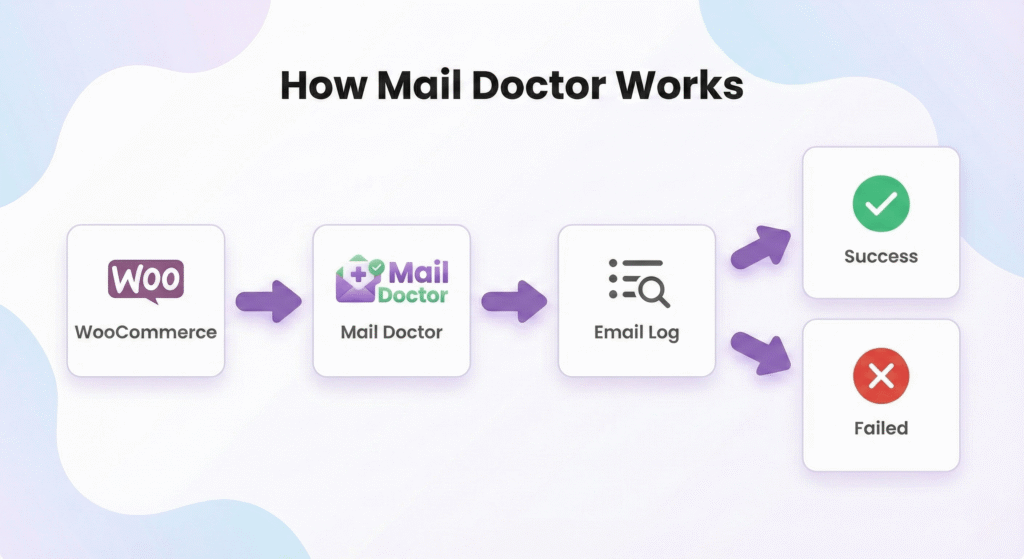
If you’re wondering “How does Mail Doctor actually fix my WooCommerce email problems?” — don’t worry.
The way it works is much simpler than most people expect.
Let’s break it down step by step.
1. Mail Doctor “Watches” Every WooCommerce Email
Whenever your store sends an email — like:
- an order confirmation
- a new order alert
- a refund notice
- a booking receipt
- a shipment update
— Mail Doctor quietly steps in and records that email before it leaves your website.
Think of it as a CCTV camera for your email system.
It doesn’t change anything.
It doesn’t slow anything down.
It just watches, captures, and logs.
2. It Checks Whether the Email Was Sent Successfully
Once WooCommerce triggers the email, Mail Doctor immediately checks:
- Was the email sent successfully?
- Did it fail?
- Did the server accept it?
- Did your email provider return an error?
If something goes wrong, Mail Doctor doesn’t hide it —
it shows you clearly so you can fix the issue before your customers complain.
3. It Saves the Email in Your Log for Future Reference
Every email is stored safely in the Mail Doctor log, including:
- Subject
- Recipient
- Status
- Timestamp
- Email contents
- Type (order confirmation, invoice, etc.)
This means you can always go back in time and check what happened — even months later.
It’s like having a complete email history for your entire store.
4. You Can Open Any Email and See It Exactly as Customers See It
Want to know what your order emails look like?
Mail Doctor lets you open and view any email exactly as your customer received it.
You can check:
- formatting
- content
- customer details
- footer information
- order items
- layout
This is extremely useful when you’re updating your store, changing plugins, or customizing email templates.
5. If an Email Fails, Mail Doctor Helps You Fix It
Email problems usually happen because your website isn’t using a proper email service (SMTP).
Mail Doctor helps by:
- Showing the exact error
- Suggesting what to fix
- Helping you test emails
- Informing you if your setup is incorrect
Even if you’re not technical, the plugin guides you like a step-by-step assistant.
6. Need to Resend an Email? One Click, Done.
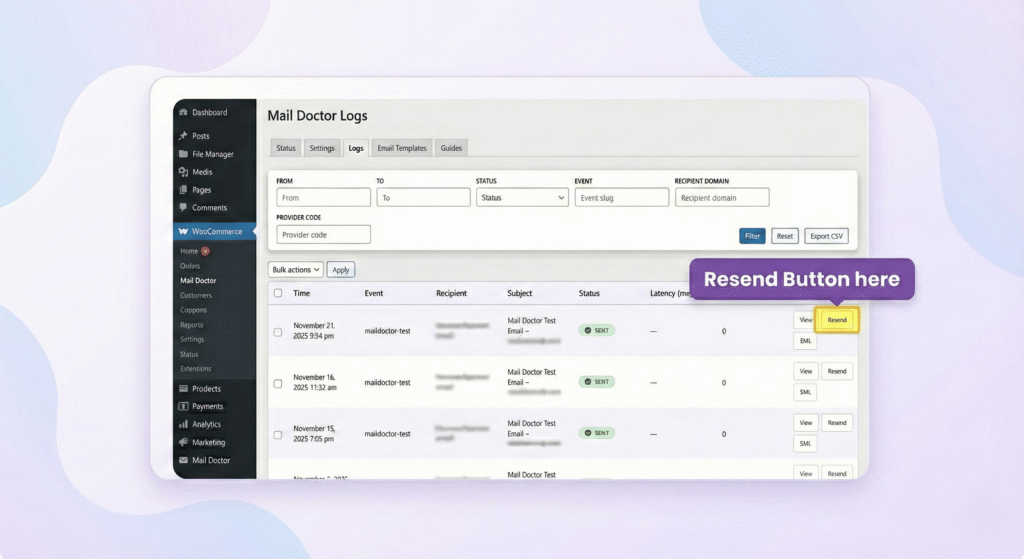
If a customer didn’t receive their email — or simply lost it — you don’t have to panic.
Mail Doctor lets you resend:
- order confirmations
- invoices
- refunds
- admin alerts
- any WooCommerce email ever sent
Just open the log → click Resend → the customer gets it instantly.
7. All of This Happens Automatically (You Don’t Lift a Finger)
Once Mail Doctor is activated, it works in the background:
- No complicated setup
- No coding
- No configuration
- No extra tools needed
It simply activates, monitors, records, and helps you whenever something goes wrong.
You get peace of mind.
Your customers stay informed.
Your store runs smoothly.
Mail Doctor is like having a full-time email expert working behind the scenes of your WooCommerce store — making sure every important message reaches the right person.
Installation & Setup Guide
Good news — installing Mail Doctor is just as simple as using it.
Even if you’re not technical, you can set everything up in just a few minutes.
Follow this easy step-by-step guide to get Mail Doctor running on your WooCommerce store.
1. Install the Mail Doctor Plugin
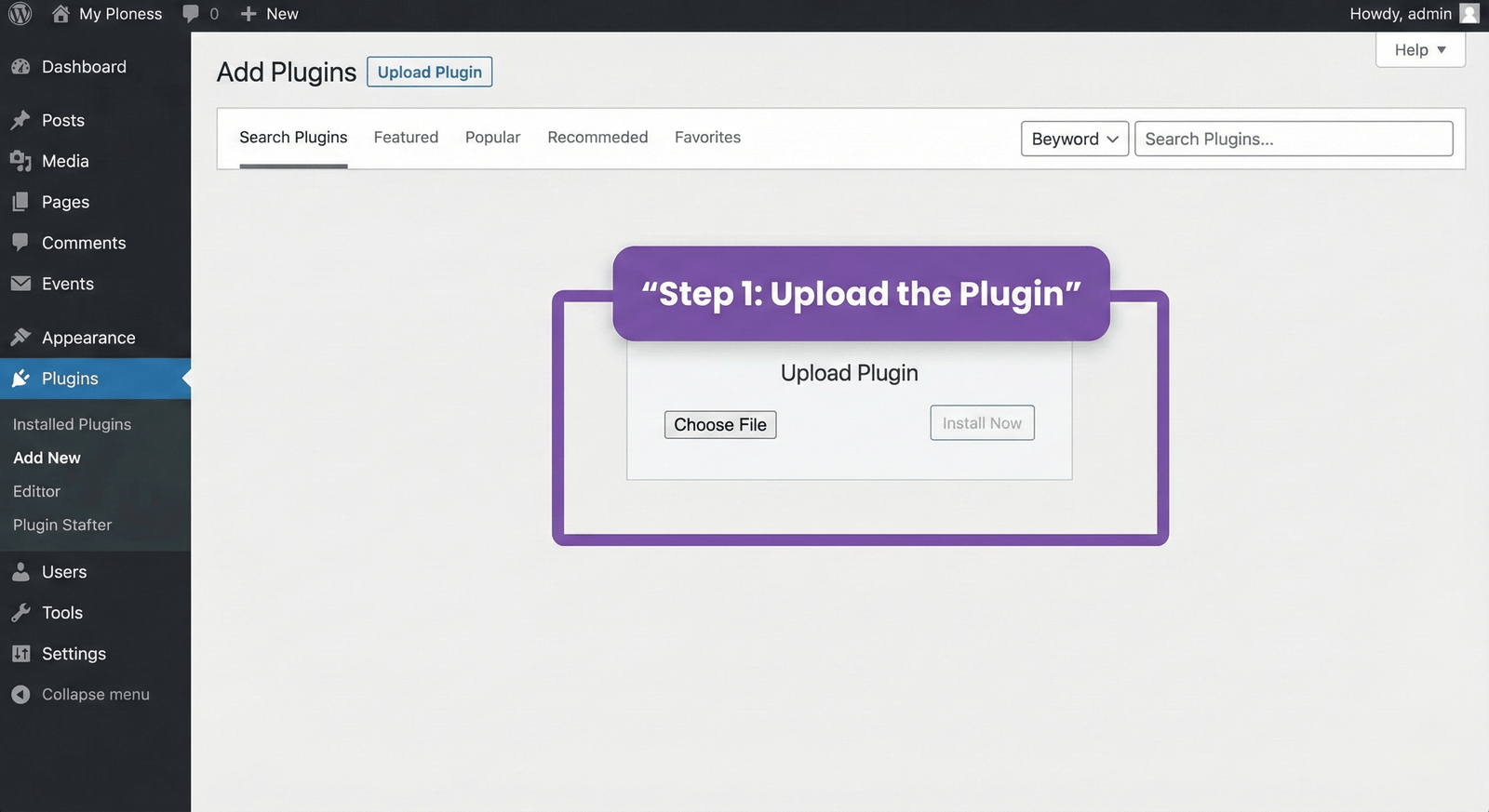
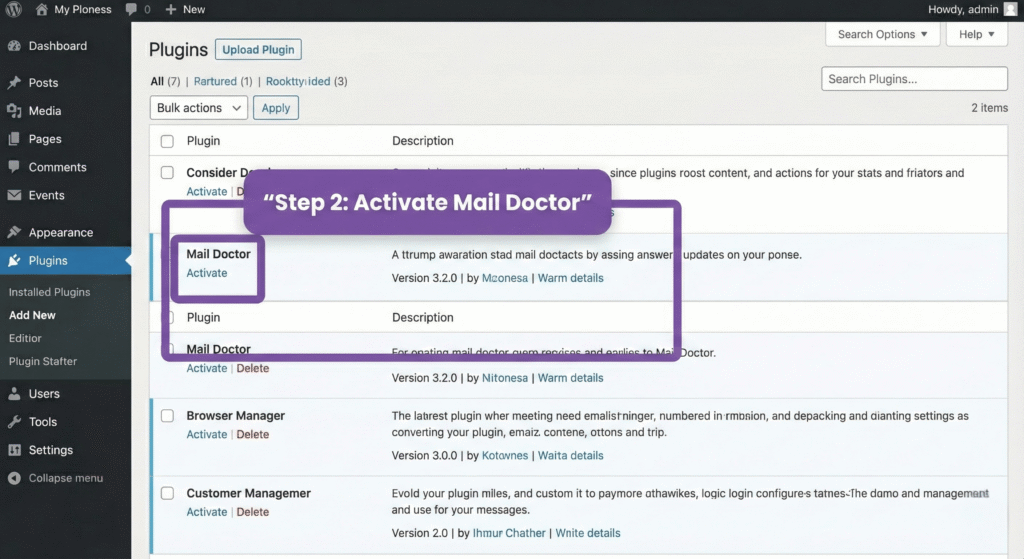
You can install Mail Doctor like any other WordPress plugin.
Option A: Install From WordPress Dashboard
- Log in to your WordPress admin panel
- Go to Plugins → Add New
- Click Upload Plugin
- Choose the
mail-doctor.zipfile - Click Install Now
- Click Activate
Done!
Option B: Install via FTP (Optional)
If you prefer FTP:
- Extract the
mail-doctor.zip - Upload the folder to:
/wp-content/plugins/ - Go to Plugins in your admin
- Click Activate
That’s it. Mail Doctor is now installed.
2. First-Time Onboarding (Quick Setup)
As soon as you activate the plugin, you’ll see the Mail Doctor Onboarding screen.
This onboarding is designed for beginners — clear, short, and visual.
It guides you through:
- What Mail Doctor does
- How it monitors WooCommerce emails
- Where to find email logs
- How to test your email system
- How to fix common problems
Just click Next and complete each step.
Within 1–2 minutes, you’ll be ready to go.
3. Run a Test Email (Highly Recommended)
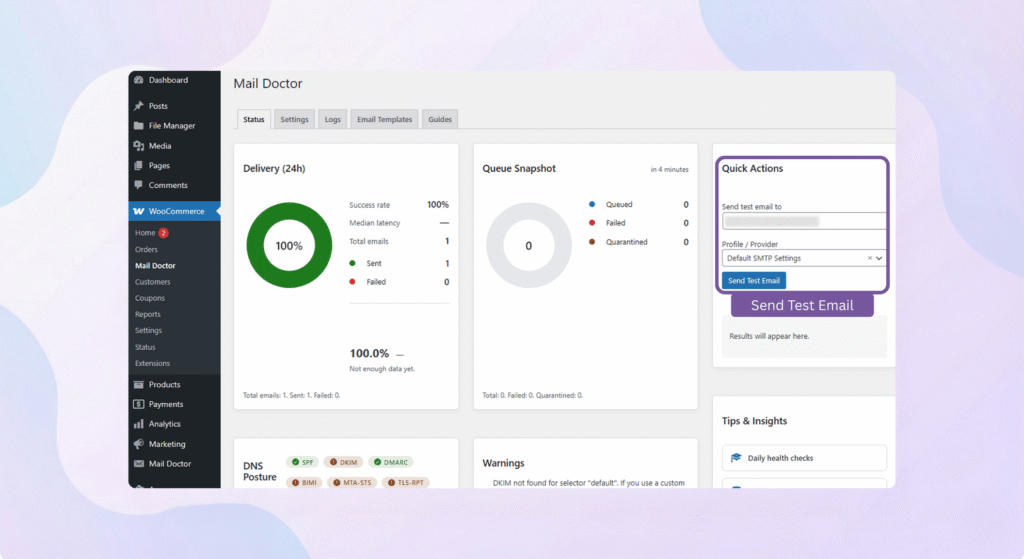
Mail Doctor includes a built-in test tool to check if your site’s emails are working correctly.
To use it:
- Go to WooCommerce → Mail Doctor → Status
- Click Send Test Email
- Enter your email address
- Check if you receive it
If the test email fails, Mail Doctor will instantly show you:
- The reason
- What’s wrong
- How to fix it
This saves you hours of guessing.
4. Set Up SMTP (For Best Email Delivery)
WooCommerce emails work best when you use a proper email provider (SMTP).
Mail Doctor works with all popular options, including:
- WP Mail SMTP
- SendGrid
- Mailgun
- Postmark
- Gmail SMTP
- Amazon SES
- Your hosting provider SMTP
Why use SMTP?
Because it increases email delivery up to 99.9%, prevents spam issues, and ensures WooCommerce emails reach customers instantly.
Mail Doctor will guide you if your SMTP setup needs attention.
5. Explore the Mail Doctor Dashboard
Once your setup is complete, go to:
👉 Mail Doctor → Logs
Here you’ll find:
- All WooCommerce emails
- Status (sent/failed)
- Customer details
- Full message preview
- Order-related emails
- One-click resend options
Spend a minute browsing the dashboard — you’ll instantly understand how helpful it is.
6. You’re Ready to Go!
From here onward, Mail Doctor works automatically.
Every email is tracked.
Every problem is highlighted.
Every failure can be fixed.
Every customer notification becomes reliable.
Mail Doctor gives your WooCommerce store the stability it deserves.
Using Mail Doctor – Full Walkthrough
Once Mail Doctor is installed, using it becomes a natural part of running your WooCommerce store. Everything is designed to be clear, clean, and easy to understand — even if you’re not technical.
Below is your complete walkthrough of how to use each part of the plugin.
1. The Mail Doctor Dashboard
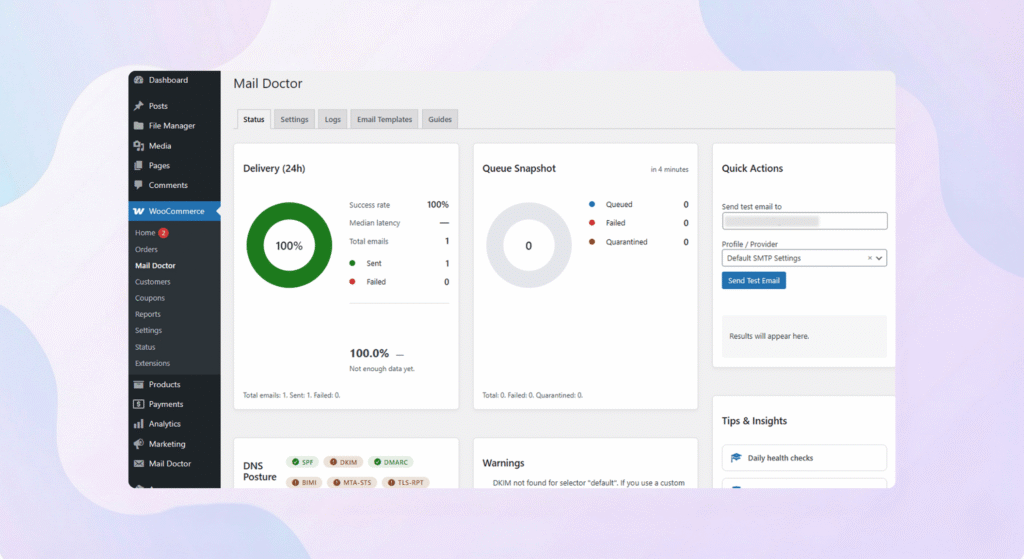
This is the main screen where you’ll spend most of your time.
Here, you’ll find:
- A list of all emails your store has sent
- Their delivery status
- The date and time they were triggered
- Who received them
- What type of WooCommerce email they are
You can think of it like a history book of your store’s email activity.
If a customer ever says they didn’t get an order confirmation, the dashboard is your first stop.
2. Viewing Email Details
Click on any email in the dashboard and you’ll see a detailed view.
This shows:
- The full content of the email
- The subject line
- Customer information
- Order details
- Any attachments
- The email type (order completed, refunded, failed, invoice, etc.)
- The exact date/time WooCommerce generated it
It’s incredibly useful for verifying what your customers actually received.
If you’ve customized WooCommerce email templates, this preview helps ensure everything looks correct.
3. Resending Emails (Customer Says “I Didn’t Get It”)
This is one of the most loved features.
If a customer claims they didn’t receive their:
- order confirmation
- invoice
- booking confirmation
- refund email
- new account email
You can fix it in seconds.
Just:
- Open the email in the log
- Click Resend Email
- The email is sent instantly
No need to remake orders, no need to guess — you take control immediately.
4. Filtering & Searching Emails
Mail Doctor includes simple filters so you can quickly find the emails you’re looking for.
You can filter by:
- Date
- Email type (order completed, failed order, invoice, etc.)
- Email status (sent or failed)
- Customer email
- WooCommerce action
This is perfect when you want to check:
- If a specific customer received their emails
- Whether a particular order triggered the right notifications
- How many emails your store has sent recently
Everything is organized for quick access.
5. Checking for Failed Emails
Whenever an email fails, Mail Doctor marks it clearly.
You’ll see a red Failed label next to it.
By clicking the email, you’ll also see:
- The error that caused the failure
- Suggestions from Mail Doctor on how to fix it
- A button to resend it once the issue is fixed
This helps you fix issues before they impact customers or order flow.
6. Sending a Test Email Anytime
Mail Doctor includes a simple test tool so you can confirm your store’s emails are working.
You can use it whenever you:
- Change hosting
- Install a new plugin
- Update WooCommerce
- Switch SMTP providers
Just go to WooCommerce → Mail Doctor → Status→ Send Test Email.
It’s a perfect way to check your email setup in seconds.
7. Understanding Email Types in WooCommerce
Mail Doctor makes it very easy to identify the type of email WooCommerce has generated.
Examples include:
- Order processing
- Order completed
- Order cancelled
- Order refunded
- Failed order
- New order (admin email)
- Customer invoice
- Booking confirmations
- Subscription renewals (if using plugins)
Each type is labelled, so you always know what’s being sent.
8. Customer Support Becomes Easier
Mail Doctor reduces support time dramatically.
Instead of saying:
“I think the email was sent… please check spam.”
You can now say:
“Yes, the email was sent at 2:43 PM. I am resending it right now.”
Your communication becomes clear, confident, and professional.
Your customers feel taken care of.
9. Mail Doctor Works Automatically in the Background
The best part?
You don’t have to do anything.
Mail Doctor:
- Monitors all emails automatically
- Logs them as they happen
- Alerts you if something fails
- Helps you fix it
- Gives you full visibility
It works quietly behind the scenes while you focus on running your store.
Mail Doctor isn’t just a tool — it’s a daily partner that protects your WooCommerce store from email problems and keeps your customers informed, satisfied, and confident in your business.
Practical Use Cases (Real WooCommerce Scenarios)
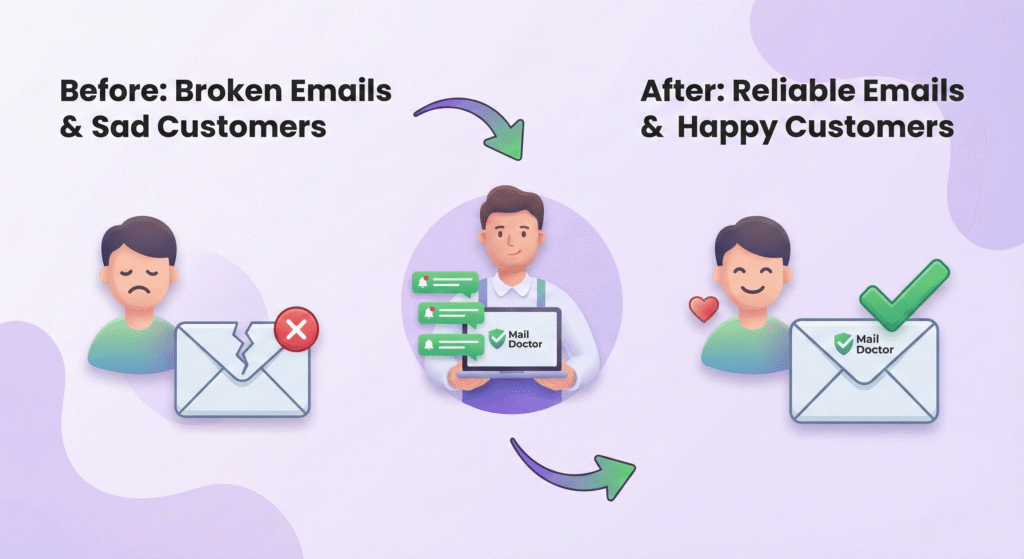
Mail Doctor isn’t a plugin you install once and forget.
It becomes a daily problem-solver for your WooCommerce store — especially when emails are involved.
Here are real situations where Mail Doctor saves the day.
1. Customers Not Receiving Order Confirmations
This is the most common WooCommerce problem.
A customer places an order, pays successfully, but…
they don’t receive the confirmation email.
Without Mail Doctor, you have no idea what happened.
With Mail Doctor:
- You instantly check the email log
- Confirm whether WooCommerce sent the email
- See exactly what it looked like
- Identify if it failed
- Resend it in one click
No stress.
No panic.
Just clarity.
2. Admin Not Receiving “New Order” Notifications
Many store owners rely on new order emails to pack and ship products.
If those emails fail, you might miss an order — or delay shipping.
Mail Doctor helps you by:
- Logging every admin notification
- Showing failed ones immediately
- Helping you fix SMTP or server issues
- Making sure no order goes unnoticed
Your workflow stays smooth and efficient.
3. Booking Confirmation Emails Not Arriving
If you run:
- a hotel
- a salon
- an event booking website
- a rental business
…your booking confirmation emails are crucial.
Mail Doctor ensures:
- Every booking email is tracked
- You can preview exactly what customers received
- You can resend missed confirmations with one click
No more “I didn’t receive my booking!” messages.
4. Refund or Cancellation Emails Not Reaching Customers
When you:
- refund an order
- cancel an order
- update order status
WooCommerce sends a notification email to your customers.
If they don’t receive it, they often open a support ticket or dispute the payment.
Mail Doctor helps by:
- Showing whether the email was sent
- Showing why it failed
- Allowing you to resend it instantly
- Improving communication and reducing disputes
This keeps customers informed — and reduces support headaches.
5. Shipment Notification Emails From Plugins Not Working
If you use shipping plugins like:
- WooCommerce Shipping
- ShipStation
- AfterShip
- TrackingMore
- Custom tracking plugins
…and those emails don’t arrive, customers get anxious.
Mail Doctor logs these too, so you can:
- Confirm if the email was triggered
- Check if it was delivered
- Send it again if needed
A smoother post-purchase experience = happier customers.
6. Contact Form Emails Not Showing Up
If your store uses:
- Contact Form 7
- WPForms
- Ninja Forms
- Elementor Forms
- Fluent Forms
- Gravity Forms
…and emails stop arriving, it becomes impossible to respond to customer inquiries.
Mail Doctor tells you:
- Whether the email was sent
- What the message contained
- If your server blocked it
- How to fix the problem
Your communication stays reliable.
7. Tracking Customer Complaints With Confidence
When a buyer says:
“I didn’t receive the email.”
Most store owners panic.
But with Mail Doctor, you simply open the log and check:
- Was it sent?
- At what time?
- To which email address?
- Did it fail?
- Should you resend it?
You respond confidently instead of guessing.
8. Testing Email Delivery After Changing Hosting or SMTP
Whenever you:
- Move to a new hosting company
- Change your domain
- Install a new SMTP service
- Update WooCommerce
Emails may break without warning.
Mail Doctor helps you test everything quickly with:
- Send Test Email
- Status checks
- Error messages
- Real-time logs
No surprises — you’re always in control.
9. Ensuring WooCommerce Email Customizations Work
If you customized your WooCommerce email templates, you want to be sure they look correct.
Mail Doctor lets you preview:
- design
- formatting
- branding
- order details
- dynamic content
So you always know your customers receive exactly what you intended.
10. Peace of Mind for High-Volume Stores
If your store sends dozens or hundreds of emails every day:
- order confirmations
- invoices
- subscription renewals
- membership notifications
Mail Doctor becomes your quality-control system.
Every email is tracked.
Every issue is visible.
Nothing slips through the cracks.
Mail Doctor gives you confidence, saves time, and ensures your WooCommerce store communicates flawlessly with every customer — every single day.
Performance, Security & Reliability
When choosing a plugin for your WooCommerce store, it’s natural to worry about three things:
- Will it slow down my website?
- Is it secure enough to handle customer email data?
- Can I trust it to work reliably every day?
Mail Doctor is built with these concerns in mind.
Here’s how it keeps your store safe, fast, and dependable.
1. Lightweight and Optimized for WooCommerce
Many email plugins load unnecessary scripts and slow down your store.
Mail Doctor is different — it’s designed to be light, clean, and optimized.
It only loads:
- essential scripts
- optimized assets
- and email-related features
This means:
- Your checkout stays fast
- Your admin panel stays smooth
- Your store performance remains unaffected
Even large stores with high email volume run Mail Doctor effortlessly.
2. Smart Log Storage (No Database Bloat)
Email logs are important — but they shouldn’t overload your database.
Mail Doctor:
- Stores logs efficiently
- Removes unnecessary data
- Uses optimized database tables
- Lets you manage retention settings
This ensures your store stays fast, even months after logging hundreds or thousands of emails.
3. Secure Handling of Customer Data
Emails often contain sensitive information, such as:
- order details
- customer names
- shipping addresses
Mail Doctor treats this data carefully.
It uses:
- Secure storage
- Clean database separation
- Proper sanitization
- Safe access controls
- WordPress security best practices
No customer data leaves your site — everything stays inside your own server.
4. Works Perfectly With All Major SMTP Providers
Mail Doctor isn’t here to replace your email provider — it enhances it.
It works smoothly with:
WP Mail SMTP
SendGrid
Mailgun
Postmark
Amazon SES
Gmail SMTP
Hosting SMTP (cPanel / Plesk)
And because it checks your email health in real time, you’ll always know when something needs attention.
5. Zero Impact on the Customer Experience
- Your customers never see Mail Doctor.
- They don’t wait longer.
- They don’t experience slowdowns.
- They don’t notice any changes at checkout or during browsing.
Everything Mail Doctor does is in the background — quietly monitoring, logging, and protecting your email flow.
Your shoppers enjoy a fast and seamless shopping experience.
6. Regular Health Checks and Clear Warnings
Mail Doctor actively monitors your store’s email activity.
If something is wrong (like SMTP misconfigured, emails failing, or hosting blocking messages), it alerts you clearly — before your customers start complaining.
This gives you:
- Peace of mind
- Early detection
- Faster troubleshooting
- Fewer support requests
Your store stays healthy and reliable.
7. Built With Modern Code Standards
You don’t need to understand code to appreciate this, but it matters.
Mail Doctor is built with:
- Modern WordPress coding standards
- Clean architecture
- Organized files
- Future-proof structure
- Compatibility with WooCommerce updates
This ensures:
- stability
- security
- long-term reliability
Your store is in safe hands.
8. Safe to Use on Any Type of Store
Whether you run:
- a small handmade shop
- a large multi-vendor marketplace
- a hotel or booking business
- a subscription site
- a high-traffic storefront
Mail Doctor handles your email load safely and efficiently.
Mail Doctor doesn’t just help with email — it protects the performance, stability, and reputation of your entire WooCommerce store.
Conclusion

Running a WooCommerce store means dealing with dozens of moving parts — payments, orders, products, customers…
But one thing quietly supports all of it:
Email communication.
Order confirmations, invoices, booking receipts, admin alerts, refund notices — these emails create trust and keep your store running smoothly.
And when even one of those emails fails, the customer experience suffers.
That’s exactly why Mail Doctor exists.
Mail Doctor Gives Your Store Three Superpowers
1. Complete Visibility
You finally know exactly what WooCommerce emails were sent, when they were sent, and who received them.
2. Instant Troubleshooting
Failed email? No problem.
Mail Doctor tells you the issue and lets you resend the message in seconds.
3. Peace of Mind
Your store becomes more reliable, your customers stay informed, and your support workload drops dramatically.
Perfect for Every WooCommerce Store
Whether you’re selling:
- physical products
- digital downloads
- bookings and appointments
- subscriptions
- memberships
- services
…Mail Doctor ensures your communication is smooth and professional.
No guessing.
No stressing.
No frustrated customers.
Just a healthy email system that works properly every day.
Ready to Make Your WooCommerce Emails Reliable?
If you’ve ever dealt with:
- customers not receiving emails
- admin notifications going missing
- booking receipts not being delivered
- refund emails not showing up
- SMTP issues
- email delays or failures
Then Mail Doctor is the solution you’ve been waiting for.
Install it once — and your store gains a full-time email supervisor working behind the scenes.
Mail Doctor isn’t just another WordPress plugin.
It’s your store’s email insurance policy — making sure every important message reaches your customers, every single time.